Features
The tools to run your summer camps.
Set up your programs and registration rules, help families book, and give staff the information they need throughout the season.
Offer camp the way your organization works.
Build your season around your programs, purchase options, and registration policies.
| Group | Registration opens | Price through April 30 | Price from May 1 |
|---|---|---|---|
| Members | March 1 | $187 | $202 |
| Public | March 15 | $224 | $239 |
- Morning9:00 to 1:00
- Afternoon1:00 to 5:00
- Full day9:00 to 5:00
- Before Care8:00 to 9:00
In this example, members receive a code for priority registration. Member pricing is handled separately at checkout. The April 30 early bird deadline applies to both rates. One half-day program for one week.
Member and public registration dates
Give members or returning families an earlier registration window using a priority code, then open registration to the public.
Member and non-member pricing
Set separate rates, with optional early bird prices for each. Give membership a clear benefit when families book camp.
Sessions and program choices
Offer weekly or multiweek sessions, morning and afternoon programs, and full-day options.
Eligibility and capacity
Set age or grade requirements and the number of places available in each program.
Care and add-ons
Sell before and after care alongside programs, plus extras such as snack passes. Set class requirements for care where needed.
Discounts
Offer promo codes and automatic savings when families choose qualifying morning and afternoon programs together.
Help families put their summer together.
Give parents a clear view of their choices, bookings, and next steps in your branded portal.
The portal works in a browser and can be added to a phone’s home screen.
Summer 2027
Plan the summer
Pick a camp for each child and week. Checkout checks seats, grades and prices again.
Planning across children and weeks
Families can build each child’s summer plan and see which programs fit the eligibility rules you set.
One checkout
Register several children for several sessions in the same order, including care and eligible add-ons.
Membership at checkout
Families can buy a membership with registration or claim an existing one for staff review. Show member prices and the membership fee in the order total.
Online forms and signatures
Collect child information, required acknowledgments, and uploaded documents. Families can see what still needs completing.
Shared family access
Invite another guardian or payer and assign access to the relevant children and account information.
Schedules, messages, and receipts
Give families a place to check bookings, complete forms, contact your office, and find payment records.
Manage the work that follows registration.
Review bookings, balances, changes, and family requests from the staff console.
Registration
Change requests
Requests from parents, oldest first. Nothing changes until you apply it.
Preview
Move Wren to the Field Station Academy, Week 4
Payments through your Stripe account
Collect card payments through Stripe. Your organization pays Stripe’s processing fees; SODAL adds no family checkout fee.
Approved pay-later accounts
Let approved families register before paying. Staff record offline payments and track the remaining balance.
Changes, credits, and refunds
Review the seat, schedule, and financial impact before approving a program switch. Apply cancellation credits under your configured policies and process card refunds through Stripe.
Waitlists and seat offers
Staff manage waitlists and offer available places with a deadline for families to accept.
Messages and announcements
Respond to family requests, send payment reminders, and share announcements with a class, session, or all registered families.
Reports and next-season setup
Export enrollment and billing reports. Copy program setup into a new season, then review dates, prices, and registration rules before publishing.
Give the front desk a view of today.
See who’s expected, check required information, and record the day’s arrivals, care, and pickups.
- Wren BennettArrived 8:52 AM
- Kenji ItoArrived 8:49 AM
- Rowan BennettPicked up by Claire Bennett1:04 PM

Daily attendance
See who’s expected, who’s arrived, and who’s gone home. Print the day’s roster when needed.
Required forms
Choose whether a form is needed before registration or arrival. Missing required forms can block the relevant step; an admin can grant a time-limited arrival exception.
Authorized pickup
Staff select an adult from the child’s authorized list and record verification. An admin can record an exception release with a reason.
Aftercare usage
Record care visits and compare usage with purchased coverage. Staff review the usage report and bill extra time.
Access for your team
Give teachers access to their assigned rosters. Choose which staff can view medical forms, with those views logged.
Shared front-desk devices
Staff sign in individually so attendance and pickup records identify who acted. Shared-device views include staff switching and automatic sign-out after inactivity.
Your camp’s identity, with help getting started.
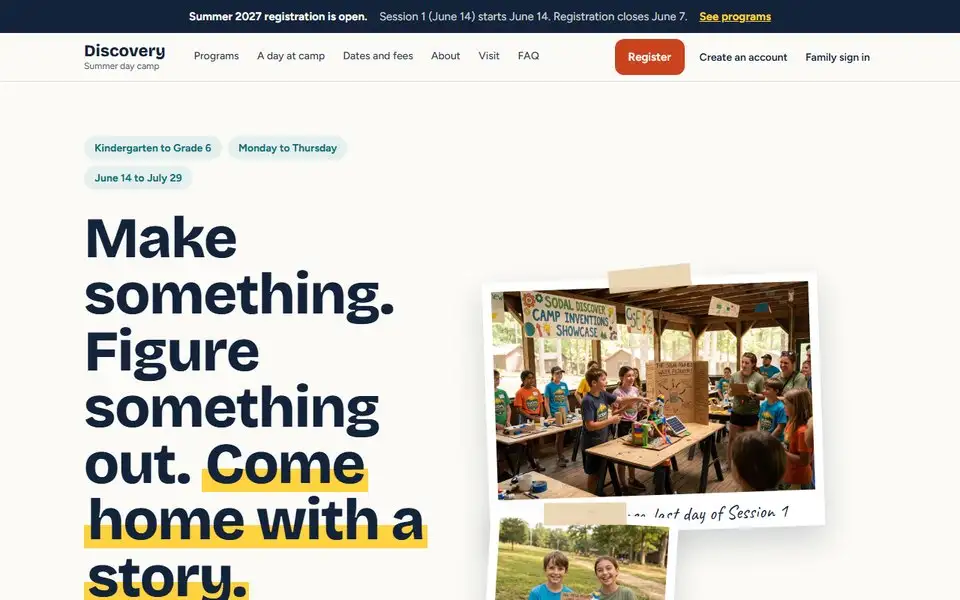
Put your program search on the website you have, or launch one from our templates. Families get a recognizable place to explore and register, and you get help preparing your first season.
Your branded portal
Use your organization’s name, colors, and logo on your registration portal, with its own camp web address.
Optional camp website included
Need a camp website? One is included with your subscription. Present your program information and give families a clear path to registration.
Program search on your existing site
Add your program search and filters to your current website with the WordPress plugin or one script. Included with your subscription. Families register in your SODAL portal.
A family questions page
Publish your camp’s answers about dates, care, policies, and what families need to know.
We set up your first season with you.
Bring your dates, programs, prices, and forms. We’ll set up the season together, test a registration, and walk your staff through the work they’ll do before launch.
You’ll work directly with Sean Roberts, SODAL’s founder, for setup and ongoing support.
See pricing and what’s includedAnswers from your camp’s own information.
The parent assistant answers family questions from your FAQ and your live class list, so your office gets fewer repeat emails. Health questions go to the health form, never the chat.
Planned, not available today: an office assistant to help prepare session imports, promo codes, and reports for your team to review.
Try it on the sample campFor families
Sample answers- Answers come from your FAQ and your live class list.
- Health questions go to the health form, not the chat.
Will it fit your camp? Let’s work through it.
Bring one week of your schedule and a rule you want to test. We’ll look at registration options, a family’s booking, and the information your staff need to run the day.